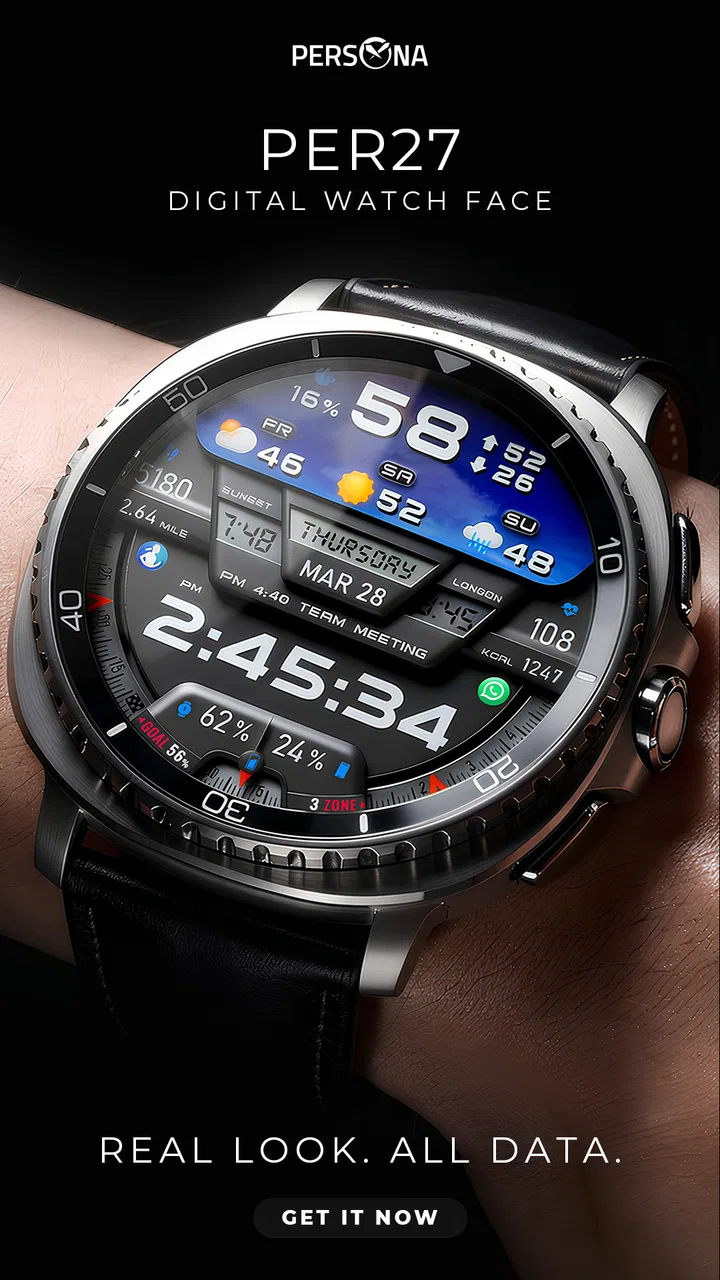
PER27 Digital Watch Face
- 4.2
- Rating
- 10.00K
- Installs
- $2.99
- Price
 Analysis by App-foxy
I spent time with PER27 Digital Watch Face as a practical personalization app for Wear OS, and its appeal became clear quickly: it treats the watch face as a compact information panel rather than a decorative clock. The design is digital, clean, and intentionally data-focused, so the experience is less about visual novelty and more about deciding what deserves a glance on your wrist.
That approach makes it easy to recommend to someone who wants more useful information without turning the watch screen into a cluttered dashboard. It is also a paid app from PERSONA Watch Face, priced at $2.99, which sets a different expectation from the many free faces available. I would not choose it simply because it is inexpensive; I would choose it because its restrained layout and information density fit the way I use a smartwatch.
How the face feels during everyday use
The first thing I noticed was how quickly the face communicates the basics. A digital layout does not ask me to interpret hands or decorative markers before reading the time. That matters when I am walking, checking my wrist between tasks, or trying to avoid taking my phone out during a meeting. The clean presentation gives the important information a clear visual priority.
You May Also Like

 Blood Strike: 2.5 Anniversary
Blood Strike’s Loadouts Turn Every Drop Into a Tactical Gamble
A close look at Blood Strike’s custom loadouts: how fast access to signature weapons reshapes its battle royale rhythm, rewards preparation, and narrows the gap between fights.

 Pandora - Music & Podcasts
Pandora’s Music Is Easy to Start, but Harder to Recover
Pandora’s strength is its low-effort path from a seed to a station. Its weak spot is how much confidence it asks you to place in connection, setup, and quiet recovery.

 8 Ball Pool
 Is Built on Rivalries, Rematches, and Routine
A close look at the rivalries, rematches, shared routines, and unanswered safety questions that turn a quick pool match into a persistent mobile community.

 Samsung Music
’s Quiet Strength Is Playing What You Already Own
Its reach comes less from spectacle than from dependable access to a personal library. That simplicity is both the app’s strongest retention engine and its ceiling.

 AccuWeather: Weather Radar
AccuWeather Review: A Quick, Clear Forecast for Everyday Decisions
For everyday plans, the best forecast is the one you can understand quickly. AccuWeather makes rain timing, radar, and local conditions easy to act on, with a few trade-offs.

 Hill Climb Racing
Why Hill Climb Racing Still Turns Crashes Into One More Run
A tiny car, a bumpy hill and one more upgrade: Hill Climb Racing keeps resurfacing because its simple chaos makes every near-miss feel personal.
More From Our News Desk
View All News


Its data-rich character is useful, but it also creates a decision for the wearer: more information is only helpful when it remains readable at a glance. I found the concept most convincing when I treated the face as a quick status screen rather than a replacement for every app on the watch. It can help me decide whether I need to open another screen, but it cannot make every detail equally prominent without some visual compromise.
For ordinary use, the perceived speed is tied less to animation and more to how little effort is needed to understand the display. A face that presents the time plainly feels responsive even when I am only looking for one small detail. PER27 Digital benefits from that directness. There is no need to decode an elaborate visual style before I know what the watch is telling me.
I also like that the design belongs naturally to the personalization category. It changes the character of the watch without asking me to install a separate productivity tool or alter my wider routine. The developer, PERSONA Watch Face, has focused the product on the watch-face layer itself, and that narrow purpose helps keep the experience understandable.
What happens when I check it repeatedly
A realistic example is a busy morning when I am moving between a commute, messages, and appointments. I may look at the watch dozens of times, but most checks last only a second. In that situation, a data-rich digital face earns its place when it answers the immediate question without making me launch anything. I can glance, register the time and visible status information, and continue what I was doing.
During heavier use, the most important trade-off is visual concentration. If I am checking several pieces of information at once, the face has to balance compactness with legibility. A clean design helps, but a person who prefers one oversized time display may find the additional data distracting. This is not a flaw unique to this face; it is the natural cost of choosing information density over minimalism.
I would set it up before relying on it during a demanding day. The useful workflow is to decide which information I genuinely consult and then resist treating every available detail as equally important. That small habit makes the face feel faster because I am not searching the screen. It also prevents the common smartwatch problem where a supposedly helpful display becomes a tiny wall of competing numbers.
Another practical point is that a watch face is often viewed in imperfect conditions: while walking, under changing indoor light, or with the arm moving. A restrained digital arrangement generally has an advantage over highly ornamental alternatives because the eye has fewer shapes to interpret. Still, anyone with a strong preference for very large typography should compare the face at the actual size of their watch before committing to the purchase.
Stability and recovery in a watch-face routine
For me, reliability means more than whether the face appears immediately after installation. It means that the watch continues to feel familiar after ordinary interruptions, such as switching away from the face, charging, or returning to the watch after a period of inactivity. PER27 Digital is best understood as a face I can make part of a stable daily setup, rather than something I need to interact with constantly.
The simple visual direction works in its favor here. A face with a clear identity is easy to recognize when I return to the watch, and a digital arrangement reduces the mental effort of reorienting myself. I do not have to remember a complicated visual system. The experience is straightforward: wake the watch, read the display, and move on.
Recovery is also about what I do when the watch is busy with another task. I would not expect a watch face to replace the underlying health, communication, or scheduling apps. Its job is to provide a useful starting point. When I need deeper information, I still open the relevant function. PER27 Digital feels most reliable when I use it within that boundary instead of expecting the face to perform work that belongs to a full application.
Because it is a Wear OS watch face, compatibility with the watch itself is an important practical consideration. The product is clearly intended for that platform, so I would check that my device runs Wear OS before buying. That is a more meaningful compatibility check than simply asking whether the phone is Android or iOS, because the face lives on the watch rather than acting as a general phone personalization app.
The age rating is Everyone, which makes the purchase straightforward from a content perspective. The decision is mainly about fit: whether I want a clean, information-oriented face and whether my watch supports the required environment. For a family member who wants a calm, readable watch display rather than a novelty design, that broad content rating is reassuring, though personal taste still matters more than the rating.
Performance expectations and resource trade-offs
I am cautious about making strong claims about battery impact from a watch face alone, because the result can vary with the watch, display behavior, and how often the wearer checks it. What I can say is that PER27 Digital presents itself as a focused face rather than a full watch application. That makes it a sensible option for someone who wants information available at the surface without adding another large workflow to the device.
The data-rich layout may encourage more frequent glances, which is useful but can change how I use the watch. If I keep checking every visible item simply because it is there, the face becomes a source of distraction. My best approach is to let the display support existing habits: time checks, quick status checks, and deciding whether a deeper action is necessary.
In heavy-use moments, perceived performance is also affected by the watch's own limits. Smaller screens, older hardware, or a wearer who needs very large text can make any information-dense face feel less comfortable. I would choose a more minimal alternative if my priority were maximum visual simplicity or if I regularly struggle to read compact elements while moving.
That is the central trade-off in this product. The face gives me more at a glance than a bare digital clock, but it asks me to accept a busier screen. The clean styling keeps the information from feeling chaotic, yet it cannot remove the basic limitation of a small wearable display. People who enjoy configuring a watch around useful at-a-glance details will likely see that as a worthwhile exchange.
Who should use it, and who should skip it
I would recommend it to Wear OS owners who want their watch to feel informative without looking flashy. It suits someone who checks the wrist often, prefers digital time, and values a face that can act as a launch point for the rest of the watch. It is especially appropriate for a person who wants personalization to improve daily awareness rather than simply change colors or add decoration.
The purchase also makes sense for someone who has already tried extremely minimal faces and found them too empty. PER27 Digital adds substance while keeping a clean overall direction. The price of $2.99 is reasonable if I expect to keep the face in regular rotation, particularly because a paid purchase can be easier to justify when the design solves a specific problem for me: seeing more useful context without navigating through menus.
I would skip it if my ideal watch face is almost blank, oversized, and focused on the time alone. I would also look elsewhere if I want a highly expressive design built around illustrations, changing themes, or a strong decorative identity. PER27 Digital is not trying to be a visual toy. Its value comes from information hierarchy and practical access, so someone seeking constant novelty may find it too restrained.
It may also be the wrong choice for a watch with a particularly small display if I need every element to be large and effortless to read. In that case, a simpler face with fewer visible items could be more comfortable. The same applies if I rarely look at anything beyond the time. Paying for information I will not consult is not a good bargain, even when the purchase price is modest.
How it compares with common alternatives
The usual alternative is a free digital face that shows the time prominently and perhaps offers a small number of additional details. That option can be perfectly adequate, especially for someone who wants the lowest-cost solution. PER27 Digital has a stronger case when I want a more deliberate information layout and prefer a clean, data-oriented presentation instead of choosing a generic default.
Another alternative is an analog face. Analog designs can look more traditional and may be easier to personalize visually, but they are not as immediate for everyone. I read a digital time display faster, particularly when I am in motion or only glance for a moment. If that is also true for you, the digital format is a practical advantage rather than a cosmetic preference.
There are also highly decorative faces that emphasize color, animation, or themed artwork. Those can make a watch feel more personal, but they usually compete for attention with the information itself. PER27 Digital takes the opposite route. I would choose it when I want the watch to look organized and useful, not when I want it to resemble a miniature poster.
The paid-versus-free decision comes down to consistency. A free face is better if I am still experimenting or change designs frequently. The $2.99 purchase is easier to defend when I want one dependable daily face and appreciate the specific balance between a clean appearance and visible data. Its average rating of 4.2 from nearly a thousand ratings suggests that many users find the idea successful, while the rating also leaves room for the personal fit issues that come with wearable layouts.
Installation, setup, and daily habits
I would approach setup with a short trial period rather than judging the face from a single glance. Wear the watch through a normal workday, check it outdoors and indoors, and notice whether the information you see is genuinely useful. This is a better test than admiring the layout in a static preview because the face's value depends on quick reading during real movement.
One useful workflow is to assign the face to a period when quick status checks matter most, such as commuting or working through a schedule-heavy day. If it reduces the number of times I need to open another screen, it is doing its job. If I keep ignoring the extra information, that is a clear sign that a simpler face would suit me better.
I would also avoid changing several watch settings at once during evaluation. Keeping the rest of my routine familiar makes it easier to tell whether the face itself feels comfortable. After a day or two, I can decide whether its density helps or merely adds visual noise. That kind of test is particularly important for a paid personalization app because the right choice depends on repeated use, not just first impressions.
Since the app was released on February 15, 2024, it has had time to establish a visible user base, with over ten thousand installs. Those figures do not replace personal testing, but they do make it feel like a real, actively chosen product rather than an obscure experiment. The developer's focus on watch faces is another reason I would consider it alongside other dedicated Wear OS options.
My performance verdict
PER27 Digital Watch Face feels quick in the way that matters most for a watch face: it gives me a direct, readable starting point for a glance. Its clean digital style avoids unnecessary visual drama, while the data-rich approach makes the watch more useful for people who want context available without opening a separate screen.
Its limitations are equally clear. More information can mean a less relaxed display, compact elements may not suit every watch or eyesight preference, and no watch face can substitute for the deeper functions behind the data. I would not select it for decoration, extreme minimalism, or constant visual novelty.
For the right wearer, though, the balance is convincing. I see it as a practical paid personalization choice for someone who wants a dependable Wear OS face that feels organized, informative, and easy to return to after interruptions. The best reason to choose it is not that it shows more, but that it can make the information I actually need easier to reach. With an Everyone rating and a $2.99 price, it is a low-risk purchase for that specific use case, provided the watch supports Wear OS and the wearer genuinely prefers a data-focused digital display.
After using it as an everyday face, I would recommend giving it a fair trial during real routines rather than comparing screenshots alone. If the extra information helps me make faster decisions at a glance, it earns its place. If I keep searching for a simpler screen, a minimal free alternative will be the better answer. That distinction is what makes this app worth considering: it has a clear purpose, and it works best when that purpose matches the way I use my watch.
FAQs for PER27 Digital Watch Face
01What is PER27 Digital Watch Face?
PER27 Digital Watch Face is a customizable digital watch face designed for compatible Wear OS smartwatches. It focuses on a clean, information-rich layout, typically displaying the time alongside useful details such as the date, battery status, and activity-related data. Its exact appearance and available information may vary depending on your watch model, Wear OS version, and the permissions enabled during setup.
02Which smartwatches are compatible with PER27 Digital Watch Face?
Compatibility depends mainly on whether your smartwatch runs Wear OS and supports third-party watch faces. Before downloading, check the app listing for the currently supported Wear OS versions and devices, since older watches or watches running proprietary systems may not be supported. It is also worth confirming that the watch face is installed through the correct Play Store account connected to your smartwatch.
03Can I customize the PER27 Digital Watch Face?
The available customization options depend on the version of PER27 and the watch model being used. In general, users should look for settings that control colors, displayed complications, and the information shown on the screen. Some options may be adjusted from the watch itself, while others can be configured through the companion installation process. Not every complication is available on every device.
04Does PER27 Digital Watch Face affect battery life?
Like any active watch face, PER27 uses a small amount of battery power because the display remains available and may update information throughout the day. Battery impact is usually influenced more by the screen technology, brightness, always-on display settings, complications, and health sensors than by the watch face alone. Disabling unnecessary complications or always-on mode can help extend battery life.
05How do I install and use PER27 Digital Watch Face?
Install PER27 through the Google Play Store on a compatible Android phone or directly on your Wear OS smartwatch, depending on the installation options offered. After installation, open the watch-face selector on the watch and choose PER27 as the active design. If it does not appear immediately, verify that the watch is connected, both devices use the same Google account, and the watch software is up to date.
Pros
- Clean digital layout makes the time easy to read at a glance.
- Includes useful complications for weather
- battery
- steps
- and more.
- Several color and display options allow easy personalization.
- Designed to suit both casual outfits and everyday activity tracking.
- Low visual clutter keeps the watch face looking modern and practical.
Cons
- Full functionality may depend on the Wear OS watch model used.
- Some customization options may require the companion app or a purchase.
- Small complication areas can be difficult to read on compact screens.
- The digital style may feel too simple for users wanting an analog face.
- Battery impact can vary depending on always-on display and complications.

PER27 Digital Watch Face
Gallery